





Sharing a photo with your penpal
Once you know a penpal well, you can share a photo with them safely on the site. Here is how it works, and the simple rules that keep photo sharing safe for everyone.
When can you share a photo?
Photo sharing only becomes available in a conversation once all of these are true:
- You are both 18 or older For everyone’s safety, photo sharing is for adult members only. It is never available in conversations involving a younger member.
- Trust is established in the conversation You and your penpal have each sent a few messages and have been chatting for over a week.
- Your penpal has photo sharing switched on Each person can choose whether to receive photos in a conversation — see “Staying in control” below.
When these are met, a small photo icon appears inside the message box, in the bottom left corner. If you do not see it, one of the steps above is not yet complete.
How to send a photo
- Open the conversation and tap the photo icon in the bottom left
corner of the message box.
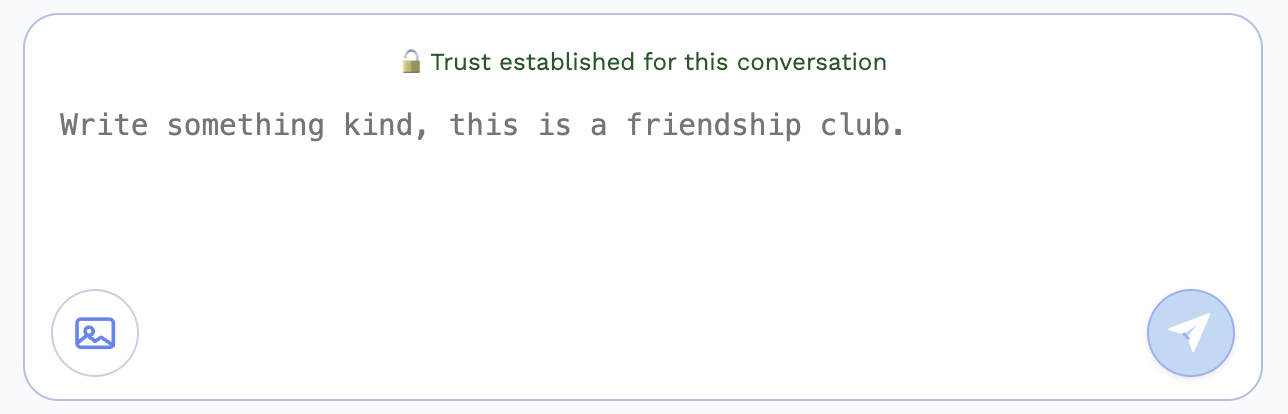 Screenshot: the photo icon in the bottom left corner of the message box.
The photo icon sits inside the box, under where you type your message. - Read the short photo rules, then tap I understand — choose photo.
- Choose a JPG or PNG photo (under 5MB). It uploads and appears
in your conversation straight away.
Free members can share up to 10 photos in total, and up to 1 a day. Premium members can share up to 5 a day with no overall limit.
What you may not share
To keep photo sharing safe for our whole community, please never send:
- Adult, sexually explicit or nude images
- Violent or graphic images
- Illegal content, such as drugs or weapons
- Photos you do not have the right to share
- Photos of other people without their permission
- Promotion, advertising or solicitation of any kind
Staying in control
You are always in charge of the photos in your conversations:
Turn it on or off. At the top of any conversation there is a switch to allow or stop that penpal sharing photos with you.
Remove a photo. You can remove any photo from your own chat at any time.
Report a photo. If a photo breaks the rules above, tap Report on it and tell us why — our security team will review it.
